Odisha Farmer ID Card Download 2026: Agrisnet, Krushak and AgriStack Explained
Read in another language:
If you registered as a farmer in Odisha and now need a printed copy of your Farmer ID, you can download it from the official Agrisnet Odisha portal at agrisnetodisha.ori.nic.in. It takes about five minutes and you only need to know your district, block, Gram Panchayat and village.
There is one thing that confuses almost everyone, though. Odisha now has three different farmer systems running side by side: the older Agrisnet Farmer ID, the Krushak Odisha registration, and the newer AgriStack Farmer ID. Many farmers search for one, download the wrong thing, and then wonder why a bank or an office doesn’t accept it. This guide explains which one is which, and walks you through each process in plain steps.
Last checked against official portals: 9 October 2026.
Quick Answer: How to Download the Odisha Farmer ID Card
- Open the official Agrisnet Odisha farmer page.
- Click Farmer List.
- Select your District, Block, Gram Panchayat, Village and the status Generated.
- Click your name or ID in the list to open the card.
- Print the page and choose Save as PDF.
Full steps with details are below.
Which Farmer ID Do You Actually Have?
Before you download anything, find out which system your registration belongs to. Here is the difference in simple terms.
| System | Run by | Official portal | What it is |
|---|---|---|---|
| Agrisnet Farmer ID | Directorate of Agriculture and Food Production, Odisha | agrisnetodisha.ori.nic.in | The older farmer ID. You can check status, search the farmer list and view or print the card. |
| Krushak Odisha | Department of Agriculture and Farmers’ Empowerment | krushak.odisha.gov.in | Odisha’s unified farmer database. You log in with Aadhaar and OTP and keep your profile updated. |
| AgriStack Farmer ID | Government of India with the Odisha government | odfr.agristack.gov.in | The new digital Farmer ID linked to your Aadhaar and land records. |
| Paddy procurement registration | Food Supplies and Consumer Welfare Department | ppas.pdsodisha.gov.in | A seasonal registration for selling paddy at government centres. It is separate from the three IDs above. |
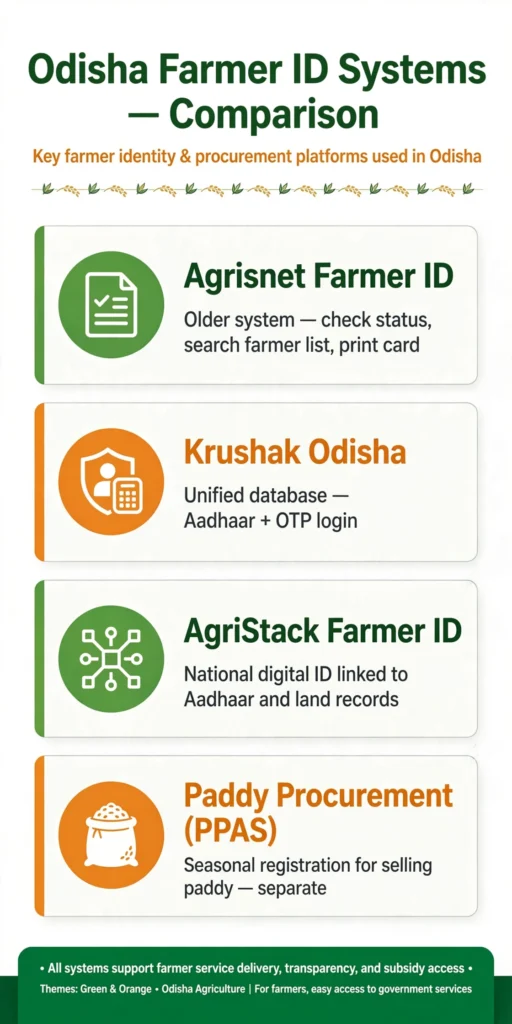
If you registered years ago through a Block Office or a Mo Seba Kendra, you most likely have an Agrisnet ID. If you registered more recently, check Krushak Odisha and AgriStack too.
What Is the Odisha Farmer ID Card?
The Farmer ID card is an identity record that shows a farmer is registered with the Odisha agriculture department. It is not a cash scheme, and nobody gets money just for holding the card. What it does is make it easier to prove who you are as a farmer when you apply for seeds, subsidies, crop related services and other agriculture schemes.
The Agrisnet portal has a few sections you will use: Home, Farmer ID Status, Farmer List, a Seed Portal link, and Farmer ID Registration. We checked the portal directly, and these are the links that appear in its menu right now.
How to Download Farmer ID Card Odisha (Agrisnet Method)
You don’t need to log in to view your card. You just need to find your record in the farmer list.
Step 1: Open the official portal. Go to the Agrisnet Odisha farmer page at agrisnetodisha.ori.nic.in.
Step 2: Click “Farmer List”. This opens the search page where you choose your location.
Step 3: Fill in your area details. Select your District, Block, Gram Panchayat and Village. Choose the status Generated, enter the captcha shown on screen and click Search.
Step 4: Open your record. The list shows details such as Voter ID, Farmer ID, farmer name, father’s name, village, category and gender. Click the blue link against your name to open your Farmer ID details or acknowledgement slip.
Step 5: Save it as a PDF. Press Ctrl + P, choose Save as PDF as the printer, and save the file. On a phone, use the browser menu and pick Print, then Save as PDF.
A quick note on something you may read elsewhere. The “Export to Excel” button on the list page downloads the whole village list as a spreadsheet. It does not give you your personal card. If you only need your own ID, use the print method above.
Details You Need Before You Start
- Your district, block, Gram Panchayat and village (spelled as the portal shows them)
- Your name, father’s name or Voter ID, so you can spot your record in the list
- A phone or computer with internet and a printer or “Save as PDF” option
You don’t need to upload any documents just to view and download the card.
Check Odisha Farmer ID Status
If you applied recently and can’t find your name, check the status first.
- Open the Farmer ID Status page on Agrisnet.
- Enter your Reference ID, Voter ID, Aadhaar number, mobile number or account number.
- Click Submit.
Farmer ID List Odisha: Generated, Pending and Rejected
The Agrisnet farmer list lets you search by status. This is useful when your card doesn’t show up under Generated.
| Status | What it usually means | What to do |
|---|---|---|
| Generated | Your Farmer ID has been created | Open your record and save the card as a PDF |
| Pending | Your application is still under verification | Wait, then check again. Visit your Block Office or Mo Seba Kendra if it stays pending for a long time |
| Rejected | Something in the application didn’t match or was incomplete | Contact the block agriculture office to correct the details and reapply |
Use the same Farmer List page, switch the status, and search again. You can also use Export to Excel here if you want the full village list for reference.
Krushak Odisha: Login and Registration Status
Krushak Odisha is the state’s unified farmer database, built by the Department of Agriculture and Farmers’ Empowerment. If your Agrisnet record is old or missing, this is the portal to check next. We have a detailed guide on Krushak Odisha Registration 2026: Online Apply, Status Check and Login if you need the full process.
According to the official Krushak Odisha registration handout, the process works like this:
- Go to krushak.odisha.gov.in.
- Enter your Aadhaar number under the Know Your Status section and submit. If your Aadhaar is already registered, the portal asks you to log in. If not, you continue with registration.
- Enter the OTP sent to the mobile number linked with your Aadhaar.
- Open My Profile to update your demographic details, bank details and occupation details.
- Add crop, animal, fishery or forestry details if they apply to you.
- Upload any document the portal asks for (for example, a caste certificate if the number you entered isn’t valid) and submit. You get an Application ID. Keep it safe, because you’ll need it later.
If your mobile number isn’t linked to your Aadhaar, the OTP won’t reach you. The portal’s manual says the number must be updated through UIDAI, so visit the UIDAI website (uidai.gov.in) to find your nearest Aadhaar centre. We covered a similar Aadhaar based verification in our guide on Subhadra Yojana Face eKYC 2026, and the same rule applies: details have to match your Aadhaar exactly.
A common search is “Krushak Odisha beneficiary list”. The official handout describes checking your registration by Aadhaar number, so that is the method to use.
AgriStack Farmer ID in Odisha
AgriStack is the Government of India’s digital system for agriculture. At its centre is a Farmer Registry that gives every farmer a unique, Aadhaar linked Farmer ID tied to their land records. The Union Agriculture Ministry told Parliament in February 2025 that the target is to create 11 crore Farmer IDs by 2026-27.
For Odisha, the Farmer Registry runs on odfr.agristack.gov.in. The national site is agristack.gov.in. Registration happens at Primary Agricultural Cooperative Societies (PACS) and Common Service Centres (CSCs), and Village Agricultural Workers are helping farmers in many areas.
What you should keep ready:
- Aadhaar card with a linked mobile number
- Record of Rights (ROR) for your agricultural land
Is AgriStack ID compulsory in Odisha? For selling paddy this Kharif season (2026-27), the Odisha government has said it is not. News reports from August 2026, based on an official statement, say farmers can register for paddy procurement even without an AgriStack Farmer ID, and that no farmer will be turned away. The state’s minister added that farmers without the ID can get it generated at the registration centre.
This applies to paddy procurement only. For other schemes, rules can change, so check the latest requirement on the scheme’s own website. For example, you can confirm the PM-KISAN rules directly on pmkisan.gov.in.
The paddy procurement registration itself is separate. The state’s PPAS portal publishes a district wise Farmer Registration Status Report that even shows how many registered cultivators already hold an AgriStack Farmer ID.
Common Problems and Quick Fixes
| Problem | Likely reason | Fix |
|---|---|---|
| My name isn’t in the farmer list | Wrong village or block selected, or status set to the wrong option | Try Pending and Rejected as well, and check nearby villages and your Gram Panchayat |
| Spelling looks different on screen | The record was typed in a different spelling | Search by Voter ID or use the Farmer ID Status page |
| No OTP on Krushak or AgriStack | Mobile number isn’t linked to Aadhaar | Update your mobile number through UIDAI first |
| Captcha keeps failing | Typing error or an expired captcha | Refresh the captcha and type it slowly |
| Portal is slow or not loading | Heavy traffic, common near scheme deadlines | Try early morning or late evening |
| Card shows old details | The record hasn’t been updated | Update your profile on Krushak Odisha or contact your block agriculture office |
Stay Safe: Use Only Official Websites
Genuine Odisha government portals end in .gov.in or .nic.in. Never share your Aadhaar number, OTP or bank details on a website that doesn’t end this way, and never pay anyone just to download a card you can view yourself for free. If a CSC helps you, ask what the official service charge is and take a receipt.
This website is an independent information site and is not connected to the Government of Odisha.
One More Thing for Families Applying to Other Schemes
Many farming families in Odisha apply for more than one scheme at a time. If a woman in your household is applying for Odisha’s women’s scheme, remember that household land is part of the eligibility rules. You can read the full list in our Subhadra Yojana eligibility guide, and students in the family can look at the Odisha Scholarship Portal 2026-27 guide.
Frequently Asked Questions
What is the official website to download the Odisha Farmer ID card?
The Agrisnet Odisha portal at agrisnetodisha.ori.nic.in. Use the Farmer List section to find and print your card.
Is the Agrisnet Farmer ID the same as Krushak Odisha?
No. Agrisnet is the older farmer ID system. Krushak Odisha is the state’s unified farmer database where you log in with Aadhaar and OTP. A farmer may appear in one, both or neither.
Is the AgriStack Farmer ID the same as the Odisha Farmer ID card?
No. The AgriStack Farmer ID is a separate, Aadhaar linked ID created under the national Farmer Registry. It is issued through odfr.agristack.gov.in, PACS and CSCs.
Can I download the Farmer ID card on my phone?
Yes. Open the portal in your mobile browser, find your record, then use the browser’s Print option and choose Save as PDF.
Do I need Aadhaar to download the card from Agrisnet?
Not to view the list and print your record. You only need your location details. Aadhaar and an OTP are needed for Krushak Odisha and AgriStack.
Is there a fee to download the Farmer ID card?
The official portals don’t charge you for viewing and printing your card. If you take help from a CSC, ask for the official service charge and a receipt.
What should I do if my Farmer ID status shows Pending?
Pending usually means verification is still going on. Check again after a few days. If it stays pending, visit your block agriculture office or the nearest Mo Seba Kendra with your Aadhaar and land details.
Do I need AgriStack ID to sell paddy in Odisha?
For Kharif 2026-27, the Odisha government has said it is not mandatory. You can register without it and have it generated at the registration centre. Always check the latest instructions at your PACS.
Where can I check the Odisha Farmer ID list village wise?
On the Farmer List page of Agrisnet Odisha. Select your district, block, Gram Panchayat and village, then choose the status you want to see.
More related schemes
Subhadra Yojana
Krushak Odisha Registration 2026: Online Apply, Status Check and Login
Subhadra Yojana Face eKYC 2026: Latest Update, Process and Status
Odisha Scholarship Portal 2026-27: How to Apply, Check Status and Last Date
OAVS Recruitment 2026: 815 Principal and Teacher Posts, Apply Online