IGR Odisha Property Registration 2026: Slot Booking, Fees, EC and Documents
Read in another language:
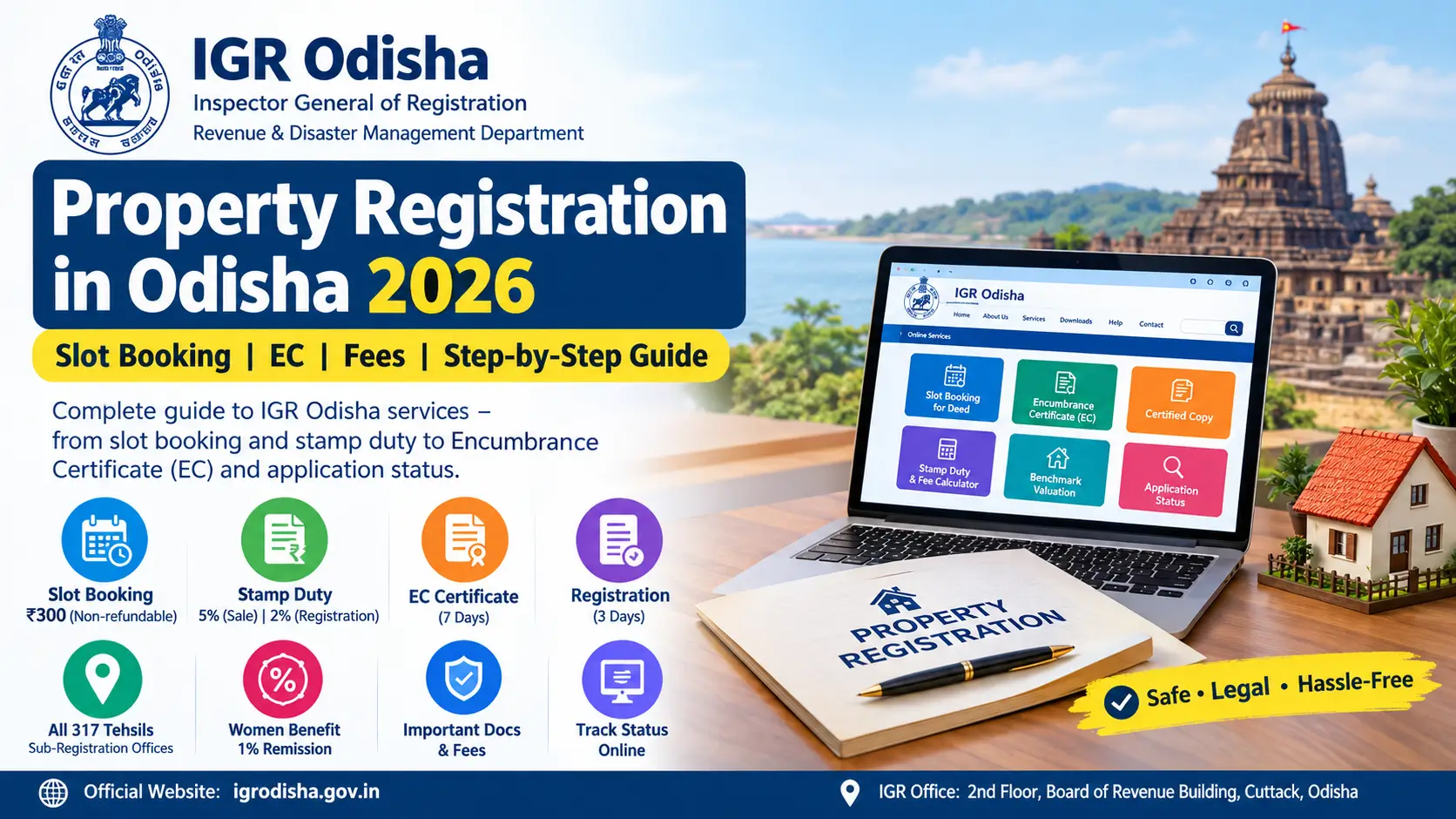
Buying or selling property in Odisha? Before visiting the registration office, you should know how to book a slot, calculate stamp duty, prepare the required documents and check the property’s registration history.
The official website, IGR Odisha, provides online services for property and deed registration, Encumbrance Certificates (ECs), certified copies, application tracking and other registration-related work. The registration process also connects with the revenue administration for mutation of land records.
This guide explains the Odisha property registration process, current slot-booking rules, common fees, documents and the steps to take after your deed is registered.
Disclaimer: This is an independent information website, not an official Government of Odisha website. Always verify the applicable fees, requirements and service availability on the official portal before making a payment.
IGR Odisha Property Registration: Quick Facts
| Particular | Details |
|---|---|
| Official website | igrodisha.gov.in |
| Department | Revenue and Disaster Management Department, Odisha |
| Online slot booking | Available through the IGR portal |
| Slot booking fee | ₹300 per slot, subject to the applicable refund rules |
| Standard stamp duty on a sale deed | Generally 5% |
| Standard registration fee on a sale deed | Generally 2% |
| Stamp duty concession for eligible women buyers | The IGR FAQ lists a 4% rate for qualifying sale and gift deeds |
| Encumbrance Certificate | Online application available |
| Certified copy | Online application available |
| Property record and mutation checks | Bhulekh Odisha (bhulekh.ori.nic.in) and relevant IGR services |
These are general reference details. The fee for your transaction may differ depending on the deed type, property valuation, applicable concessions and current government notifications.
What Is IGR Odisha?
IGR Odisha stands for the Inspector General of Registration, Odisha. It operates under the state’s Revenue and Disaster Management Department.
The portal helps citizens complete registration-related work without relying entirely on physical visits to government offices.
Its main services include:
- Online property and document submission
- Slot booking for presenting a deed
- Stamp duty and registration fee calculation
- Benchmark property valuation
- Online Encumbrance Certificate applications
- Certified copies of registered documents
- Application status tracking
- Visit Deed Request services
- Information about registration offices and applicable fees
Important distinction: IGR Odisha handles the registration of documents, while Bhulekh Odisha provides access to land-record information. Registering a sale deed does not mean you should stop checking whether the buyer’s name has been updated in the Record of Rights (RoR).
Where Can You Register Property in Odisha?
Odisha has expanded its sub-registration network to make registration services more accessible to citizens.
According to the Chief Minister’s Office announcement dated 5 February 2026, (cm.odisha.gov.in/en/node/640) Sub-Registration Offices are operational in all 317 tehsils.
However, you should not assume that every property can be registered at any office. The appropriate registering office depends on the property’s location and the applicable jurisdiction.
To identify the correct office, use the Know Your SRO service (https://www.igrodisha.gov.in/SROffice/SearchDistRoOffice.aspx) on the IGR website.
Before booking, confirm that the selected office handles your property and document type.
How to Register Property in Odisha Online
The IGR portal provides an online property and document submission facility. Depending on the service and transaction, you can prepare a deed, submit details online, obtain approval and arrange a presentation appointment.
Step 1: Check the property’s benchmark value
Start by checking the benchmark valuation for the property. This helps you estimate the applicable charges and understand the value used for registration purposes.
Visit the IGR Odisha valuation page (https://www.igrodisha.gov.in/ViewFeeValue.aspx) and select the relevant location and property details.
Do not assume that the sale price alone determines the final charges. The applicable valuation rules and the nature of the transaction matter.
Step 2: Check the ownership documents and EC
Before committing to the transaction, review the available ownership records and obtain an Encumbrance Certificate covering the required period.
An EC helps identify registered transactions or encumbrances recorded in the registration system. It should be treated as one part of property due diligence, not as a complete guarantee of clear ownership.
Also check the property’s Record of Rights, plot details and other relevant records.
Step 3: Prepare the deed
The deed may be prepared by the parties themselves, a deed writer or an advocate, depending on the transaction and their requirements.
IGR Odisha provides model deeds (https://www.igrodisha.gov.in/Model_Deed.aspx) that can help you understand the general format.
For complicated transactions, disputed ownership, inherited property or special conditions, obtain appropriate legal advice before signing.
Step 4: Submit the details online
Visit the official IGR Odisha portal and look for the online property or document submission service.
Depending on the available workflow, you may need to:
- Create an account or sign in.
- Start a new document application.
- Select the deed and transaction type.
- Enter the seller, buyer and other required party details.
- Enter the property particulars.
- Upload or provide the requested information and declarations.
- Review the calculated charges and application details.
- Submit the application and follow the office’s approval or appointment instructions.
The exact screens and requirements may vary by document type. Follow the instructions shown in your application rather than relying on screenshots from older guides.
Step 5: Calculate and pay the applicable charges
Use the IGR Odisha Stamp Duty Calculator (https://www.igrodisha.gov.in/StampDutyCalc.aspx) to check the estimated stamp duty and registration fee.
Follow the payment instructions provided by the portal. Keep the receipt and application reference number.
If you are booking a separate presentation slot, review the slot fee and refund rules before confirming it.
Step 6: Attend the registration appointment
Bring the original documents and any supporting papers requested by the registering office.
The registering officer verifies the deed and the parties’ identities. Photographs, biometric information, signatures and other formalities may be completed as required.
Make sure the necessary parties and identifiers are available when the office requires them.
Step 7: Collect the registered deed
After registration, follow the instructions for collecting or downloading the completed document.
The IGR portal also provides an application-status service that may be used to track the application and access the final document where the facility is available.
Keep the registered deed, payment receipts and application details safely for future reference.
IGR Odisha Slot Booking 2026: Fee, Rules and Process
An online slot reserves a time for presenting a deed at the registration office. The IGR portal states that a slot ticket is required for deed registration under its slot-booking procedure.
Use the official Online Slot Booking for Deed (https://www.igrodisha.gov.in/SlotBookingAllNew.aspx) service.
Slot booking rules
| Question | What to know |
|---|---|
| How much is the slot fee? | ₹300 per slot under the applicable rules |
| Is a slot ticket required? | Yes, under the department’s published slot-booking procedure |
| Can the slot be cancelled? | The published rules state that cancellation is not allowed |
| Is the fee refundable? | Generally non-refundable when the applicant fails to present the deed as booked; a technical failure resulting in payment without allotment is covered by a separate refund clarification |
| Can I book for the same day? | Availability depends on the live booking system |
| How far ahead can I book? | Check the dates offered by the current portal |
| What should I carry? | Slot ticket, original deed and supporting documents required for your transaction |
The ₹300 fee and refund conditions are addressed in the department’s November 2025 clarification. (https://www.igrodisha.gov.in/Admin/News/DocumentView.ashx?id=57) An older FAQ contains different information about the fee, so applicants should follow the later clarification and the current booking portal.
How to book a slot
- Open the official slot-booking page.
- Enter the requested party identification details.
- Provide your mobile number and complete OTP verification.
- Select the appropriate registration office.
- Choose an available date and time.
- Review the fee and booking conditions.
- Complete the payment and confirmation process.
- Save or print the slot ticket.
If you have already booked a slot, use the View and Print Slot Booking (https://www.igrodisha.gov.in/SlotViewAndConfirm.aspx) service to retrieve the booking details where available.
Before paying: Confirm that the deed is ready, the parties can attend and the required documents are complete. Do not rely on a cancellation or refund unless the applicable rules expressly permit it.
Documents Required for Property Registration
The precise document list depends on the deed type, the parties and the property. The department’s official registration document list (https://www.igrodisha.gov.in/pdf/ListOfDocuments.pdf) is a useful starting point.
Commonly requested documents and supporting papers include:
- The deed to be registered and its required true copy
- Existing ownership documents and relevant property records
- Valid photo identification for the parties and identifiers
- Passport-size photographs, where required
- PAN details or Form 60, where applicable
- An Encumbrance Certificate for the required period
- The appropriate Form A or Form B declaration, depending on the property
- A registered Power of Attorney and the attorney’s identification, where applicable
- Permission from the competent authority where a transfer is legally restricted
- Required NOCs or other permissions for special categories of property
Some transfers, including those involving restricted land or property belonging to a deity, may require additional permissions.
Check these documents before booking
Ownership records: Make sure the seller’s documents correspond to the property being transferred.
EC period: Confirm the exact period required by the registration office or lender. An incomplete EC may delay your transaction.
Declarations: Check whether Form A, Form B or another declaration applies to your property.
Identity details: Names and other particulars should be consistent across the deed and supporting documents.
Special permissions: Do not assume that a standard sale deed checklist covers every restricted or special-category transaction.
Confirm the final checklist with the relevant registration office before the appointment.
IGR Odisha Stamp Duty and Registration Fees 2026
Stamp duty and registration fees are major components of property transaction costs in Odisha. The amount depends on the type of document and the applicable valuation and fee rules.
The official government fee details (https://www.igrodisha.gov.in/GovtFeeDtls.aspx) and the stamp duty calculator (https://www.igrodisha.gov.in/StampDutyCalc.aspx) should be used to confirm the charges for your transaction.
Common deed charges
| Document type | General rate shown in the published fee information |
|---|---|
| Sale of immovable property | 5% stamp duty and 2% registration fee |
| Gift of immovable property | Generally 5% stamp duty and 2% registration fee, subject to applicable concessions |
| Agreement of sale with possession | Published table lists 5% stamp duty and 2% registration fee |
| Agreement of sale without possession | Published table lists a minimum stamp duty amount and a 2% registration fee |
| Partition | Published table lists 2% stamp duty and 2% registration fee |
| Lease of immovable property | Published table lists 2% stamp duty and 2% registration fee |
| Mortgage without possession | Published table lists 2% stamp duty and 2% registration fee |
These are general reference rates, not a substitute for checking the current fee table. Special provisions, fixed duties, concessions and changes to the fee schedule can affect the amount payable.
Is stamp duty lower for women buyers?
The IGR Odisha property-registration FAQ lists stamp duty at 4% for qualifying immovable-property purchases by women through a sale deed or property acquired through a gift deed, compared with the general 5% rate.
Read the official property-registration FAQ (https://www.igrodisha.gov.in/Property.aspx) and confirm that the concession applies to your particular transaction.
Example: Registration cost for a ₹40 lakh property
Suppose the applicable value for calculating charges is ₹40 lakh and the transaction qualifies for the general rates.
| Charge | Calculation | Amount |
|---|---|---|
| Stamp duty | 5% of ₹40 lakh | ₹2,00,000 |
| Registration fee | 2% of ₹40 lakh | ₹80,000 |
| Total | 7% | ₹2,80,000 |
If the transaction qualifies for the 4% stamp duty rate for women, stamp duty would be ₹1,60,000. Adding a 2% registration fee would give a combined total of ₹2,40,000 before other applicable charges.
These examples assume that ₹40 lakh is the applicable value for the calculation. Your actual liability may differ.
How to check the exact amount
- Open the IGR Odisha stamp duty calculator.
- Select the deed or transaction type.
- Enter the property and valuation details requested.
- Check any applicable concession.
- Review the calculation before making payment.
For apartment transfers and other transactions affected by recent amendments, confirm whether a new provision has actually commenced before relying on a reported change.
How to Apply for an IGR Odisha Encumbrance Certificate Online
An Encumbrance Certificate, commonly called an EC, provides information about registered transactions and encumbrances recorded for a property during a specified period.
It is commonly requested during property purchases, home-loan processing and other legal or financial checks.
To start, visit the IGR Odisha website (https://www.igrodisha.gov.in) and open the Online Encumbrance Certificate service.
EC application process
- Sign in or register if the service requires an account.
- Select the relevant district and registration office.
- Enter the property details requested by the portal.
- Specify the search period.
- Review the application information and calculated fee.
- Pay through the permitted payment method.
- Submit the application and save its reference number.
- Track the application and retrieve the certificate when it becomes available.
How much does an EC cost?
The EC fee depends on the search period, the property details and the applicable charges. The portal may calculate several components, including search charges, application charges and user charges.
For that reason, use the amount displayed during the live application instead of relying on an old fixed total from a third-party website.
The department’s published service timeline lists seven days for EC delivery. Treat this as the stated service timeline, not a guarantee that every application will be completed within that period.
How many years of EC should you obtain?
There is no single period that suits every transaction.
The registration office may require an EC covering the period specified in its document checklist. A bank or legal adviser may request a longer search period for a property purchase or loan.
Ask the relevant office or lender for the exact dates before applying.
More related Odisha Programs
Subhadra Yojana – Subhadra Yojana Odisha 2026
Subhadra Card 2026 – What It Is, Who Gets It and How the ₹500 Bonus Works
Odisha Free Laptop Distribution List – ₹30,000 Laptop DBT, Merit List and How to Check
Odisha Farmer ID Card Download – Agrisnet, Krushak and AgriStack Explained
Madhu Babu Pension Yojana New List Released – Check Beneficiary List, Status & Pension Amount
Mission Shakti Odisha – Rs 99.26 Crore Interest Aid Released to 1.79 Lakh SHGs
Odisha Small Savings Incentive Scheme – AU Series, Coupon Rules, Prize List
Mukhyamantri Annapurna Yojana 2026 – 10 kg Free Rice Per Person, Eligibility, Benefits and FAQs
Odisha Commercial Layer Farming Scheme (CLFY) – Rs 10 Crore Subsidy, Eligibility
How to Get an IGR Odisha Certified Copy
If you have lost a registered sale deed or need another official copy of an older document, you can use the Online Certified Copy service.
Open the IGR Odisha portal (https://www.igrodisha.gov.in) and select Online Certified Copy.
You may need to provide details such as the registration office, document particulars, parties’ names or other information that helps identify the record.
The portal will display the applicable fee and submission requirements. Save your application reference and use the status service to check progress.
A certified copy is different from an ordinary photocopy. If you need it for a court case, bank, government office or property transaction, confirm that the type of copy available is acceptable for your purpose.
How to Check IGR Odisha Application Status
You can track eligible registration-related applications through the official application-status page. (https://www.igrodisha.gov.in/ApplicationStatus.aspx)
Steps to check the status
- Open the Track Application Status page.
- Select the relevant service from the available options.
- Enter the requested application details, such as the mobile number and Application ID.
- Submit the information to view the status.
- Follow the portal’s instructions to download an available document or verify your identity using OTP.
The exact fields depend on the service you select.
For a slot booking, use the separate View and Print Slot Booking facility where applicable. Keep your application ID, payment receipt and registered mobile number available in case you need to contact the helpdesk.
What Happens After Registration? Check Property Mutation
Registration and mutation are related but different processes.
Registration records the property transaction through the registration department. Mutation updates the revenue records to reflect the relevant change in recorded ownership or possession, according to the applicable rules.
IGR Odisha’s published property-registration procedure describes transmission of the digitised Form 3 to the relevant Tahasil for initiation of the mutation process.
This means a separate application may not be required to initiate every case. However, you should not assume that the mutation is complete merely because the deed has been registered.
How to check mutation and land records
- Check the IGR Form 3 Transfer Details (https://www.igrodisha.gov.in/Form3Detail.aspx) service where applicable.
- Visit Bhulekh Odisha (bhulekh.ori.nic.in) to check available land-record information.
- Contact the relevant Tahasil if the mutation case does not appear or the record is not updated.
- Keep your registered deed and application details available for follow-up.
The important point is to verify the resulting record instead of assuming that every step has finished automatically.
IGR Odisha Contact Details and Grievance Support
For questions about property registration or an online application, use the contact information published by the department.
Inspector General of Registration, Odisha
- Office: Board of Revenue Building, Chandinichowk, Cuttack, Odisha 753002
- Telephone: 0671-2507344
- Registration helpdesk: (+91) 7894438220
- Email: helpdesk.igrodisha@gmail.com
- Online payment support: 1800 345 6739
You can also use the department’s online grievance registration page (https://www.igrodisha.gov.in/AddUserGrievance.aspx) and grievance status page. (https://www.igrodisha.gov.in/ViewUserGrievance.aspx)
Verify the current contact details on the official portal before calling or sending documents.
Common Mistakes to Avoid
Before completing your property registration, check the following:
- Booking the wrong registration office.
- Paying the slot fee before confirming that the deed and parties are ready.
- Assuming that the slot fee is refundable in every situation.
- Using an outdated stamp duty or registration fee figure.
- Applying for an EC that does not cover the required period.
- Forgetting declarations or permissions needed for a specific property.
- Entering inconsistent names or property details.
- Assuming that registration automatically completes mutation.
- Using unofficial websites for payments or submitting sensitive documents to unknown agents.
A careful document check before the appointment can save repeat visits and avoidable delays.
Frequently Asked Questions
What is the official website for IGR Odisha?
The official website is igrodisha.gov.in. Use it for registration-related services, slot booking, EC applications, certified copies and application tracking.
What is the slot booking fee in Odisha?
The applicable fee is ₹300 per slot under the government’s slot-booking rules. The refund conditions depend on the circumstances; a technical failure that results in payment without slot allotment is treated separately.
Can I book an IGR Odisha slot online?
Yes. Use the official Online Slot Booking for Deed page and follow the current portal instructions.
What is the stamp duty on property registration in Odisha?
The general published rate for a sale deed is 5% stamp duty, with a 2% registration fee. Applicable concessions and deed-specific provisions may change the total.
Do women get a stamp duty concession in Odisha?
The IGR property-registration FAQ lists a 4% stamp duty rate for qualifying property purchases by women through sale deeds and for property acquired through gift deeds. Confirm eligibility for your transaction.
How can I get an EC online in Odisha?
Open the IGR portal, select Online Encumbrance Certificate, enter the requested property and search-period details, pay the displayed fee and track your application.
How do I download a certified copy of a sale deed?
Use the Online Certified Copy service on the IGR Odisha portal. Enter the required document details and follow the instructions for payment and delivery.
Does property registration automatically update Bhulekh?
Registration can trigger the transmission of Form 3 to the Tahasil for the mutation process. However, you should check the mutation status and the resulting revenue record rather than assuming the update is complete.
Can I check my property details online?
Yes. IGR Odisha provides registration-related services, while Bhulekh Odisha provides access to land-record information. Use both where relevant to your transaction.
Final Checklist Before Registering Property in Odisha
Before you attend the registration office, make sure you have:
- Checked the property’s benchmark value and relevant records.
- Verified the appropriate registration office.
- Reviewed ownership documents and the required EC period.
- Prepared the deed and applicable declarations.
- Checked the current stamp duty and registration fee.
- Completed the required online submission and slot booking.
- Saved the application number, payment receipts and slot ticket.
- Planned to verify the mutation status after registration.
The safest way to complete IGR Odisha property registration is to verify every transaction-specific requirement on the official portal, prepare the documents in advance and check the revenue records after registration.
Information reviewed on 29 October 2026. Government procedures, fees and service timelines can change. Confirm the latest requirements with IGR Odisha before acting.
For more updates on Odisha government services and schemes, visit our Blog section.