Odisha Job Card List 2026: Check Name, Job Card Number and Download Card
The Act raises the guaranteed work from 100 days to 125 days for every eligible rural household. The Odisha government has also notified its own state scheme, which came into effect in the entire state from 1 July 2026.
People search for this in many ways: job card list Odisha, VB-G RAM G job card, G RAM G job card list, MGNREGA job card list 2026, or simply job card check 2026. All of them lead to the same public record, and this guide shows you how to check your name, find your job card number, download the card, apply if you do not have one, and track your wages. The key facts here are checked against government sources, and the links are given so you can verify them yourself.
Odisha Job Card List 2026 at a Glance
| Detail | Information |
|---|---|
| Scheme name | Viksit Bharat Guarantee for Rozgar and Ajeevika Mission (Gramin), short name VB-G RAM G |
| Replaces | MGNREGA, repealed from 1 July 2026 |
| Odisha state scheme | Viksit Bharat Guarantee for Rozgar and Ajeevika Mission (Gramin) Scheme, Odisha |
| Nodal department | Panchayati Raj and Drinking Water Department, Odisha |
| Guaranteed work | 125 days per rural household each financial year |
| Notified daily wage in Odisha | ₹300 (from 1 July 2026) |
| Card name | Gramin Rozgar Guarantee Card (earlier called job card) |
| Official list portal | vbgramg.dord.gov.in |
| Who can apply | Any rural household whose adult members are ready to do unskilled manual work |
What Changed: MGNREGA vs VB-G RAM G
Many websites still write about 100 days and old wage rates. That information is out of date. Here is the short comparison.
| Point | MGNREGA (till 30 June 2026) | VB-G RAM G (from 1 July 2026) |
|---|---|---|
| Guaranteed days | 100 | 125 |
| Card name | Job card | Gramin Rozgar Guarantee Card |
| Odisha daily wage | Older state rate | ₹300 notified by the Centre |
| Attendance | Photo based system | Face authentication, with an exception process for network problems |
| Portal for lists | nrega.nic.in | vbgramg.dord.gov.in |
Older workers still say Mahatma Gandhi NREGA job card or MNREGA job card, and that habit will continue for a while. The Ministry of Rural Development confirmed that the earlier MGNREGA stands repealed from the same date the new Act began. You can read the official explainer on the PIB website: https://www.pib.gov.in/PressReleasePage.aspx?PRID=2259703®=3&lang=1.
Will My Old Job Card Still Work?
Yes, in most cases. According to the government’s FAQ, existing MGNREGA job cards of workers whose e-KYC is complete stay valid until the new Gramin Rozgar Guarantee Cards are issued. So you do not need to run to the panchayat office today just because the name changed.
There is a second point that worries many workers. The Ministry has said that pending e-KYC should not stop a worker from demanding or getting work, and a separate exception process exists for such cases. Even so, it is sensible to complete your e-KYC at the Gram Panchayat so nothing gets stuck later.
Odisha has also decided to issue interim Gramin Rozgar Guarantee Cards so that work is not delayed while the final card design is being decided by the Centre. This was reported by Kalinga TV in July 2026. Ask your Gram Panchayat whether your household has already received one.
How to Check Odisha Job Card List Online
This is the gram panchayat job card list, also called the MGNREGA job card search or the MGNREGA list by many people. You need to know your district, block and gram panchayat. Keep them ready before you start.
- Open the official portal: vbgramg.dord.gov.in.
- Go to Analytics and Reports and choose State Reports.
- Select Odisha from the state list.
- Choose the financial year, then your district, block and gram panchayat.
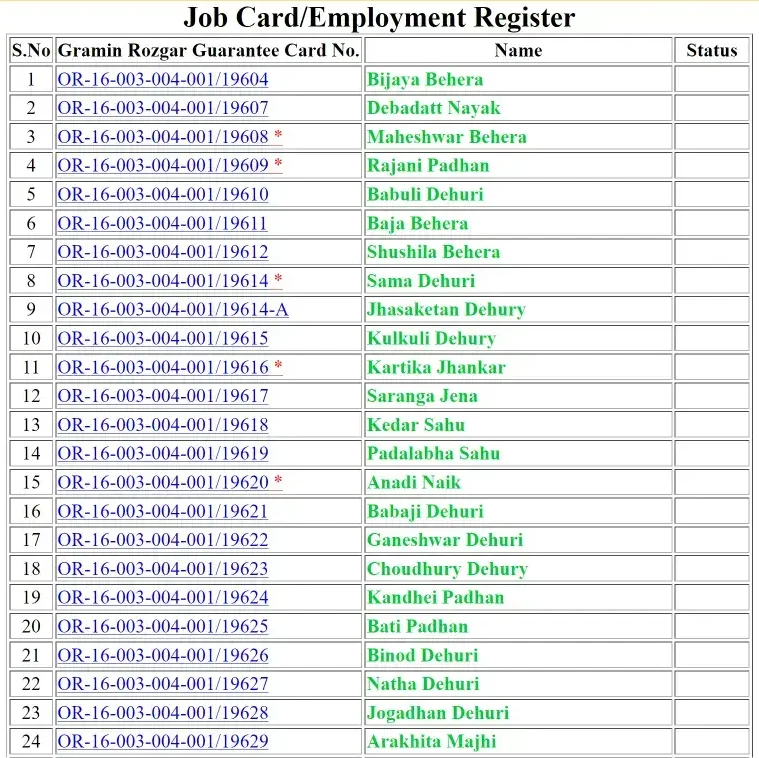
- Under the job card or registration reports, open Job Card / Employment Register.
- The list of households in your panchayat will open. Press Ctrl+F on a computer, or use “Find in page” on a phone, and type your name.
- Tap your job card number to see the full details of the household.
A small tip from experience: government portals get slow in the morning and on the first days of the month. If the page shows an error, wait a few minutes and try again instead of refreshing again and again. Menu names on the portal can also change after updates, so if you cannot see an option, look for the nearest reports section.
How to Find Your Job Card Number
Your NREGA job card number (some people call it the job card no) is printed in the list next to the name of the head of the household. If you have forgotten it, do the same steps given above, find your name, and note the number. This works as an NREGA job card number list lookup for your whole panchayat, so the job card holder list also helps when you want to check a neighbour’s or relative’s number. The same number is used for work demand, attendance and wage records, so it is worth writing it in your phone or on the back of your passbook.
You can also ask your Gram Panchayat office. They keep the register of all registered households.
How to Download the Job Card
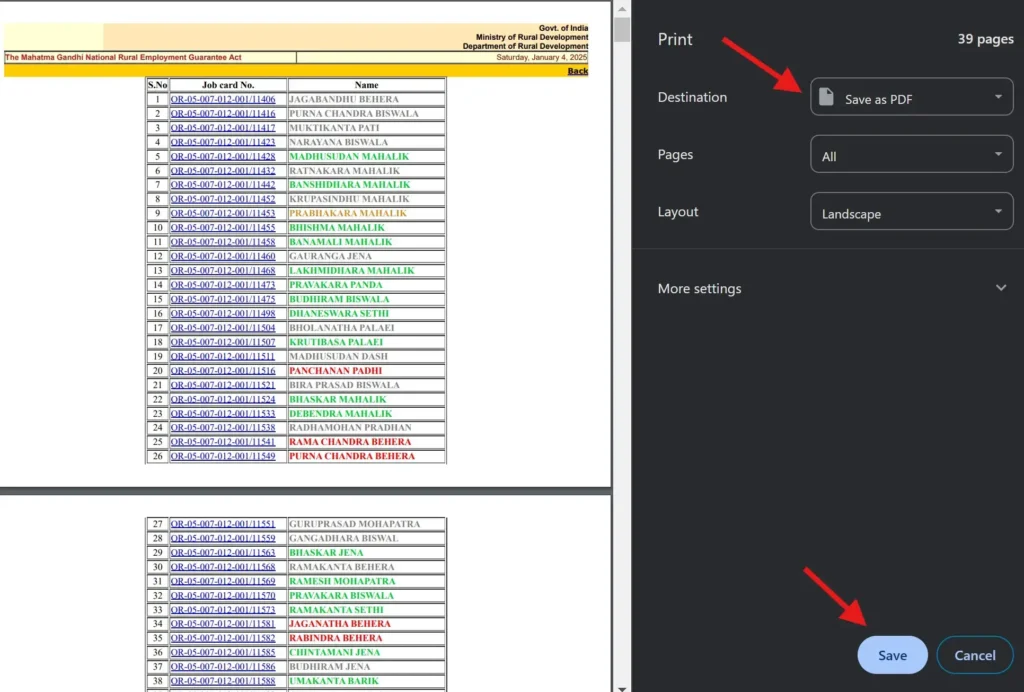
For MGNREGA job card download, or the Gramin Rozgar Guarantee Card now, once you open your household details, you can save the page as a PDF.
- On a computer, use the print option in your browser and choose “Save as PDF”.
- On a phone, use the browser menu, tap Share or Print, and save as PDF.
Keep one printed copy and one digital copy. A clear PDF is useful when you visit the block office for any correction.
Name Not in the Job Card List? What to Do
Do not panic. There are only a few common reasons.
- You never registered, so there is no card yet.
- Your household is listed under a different spelling or a different member’s name.
- You selected the wrong panchayat or block.
- The record is still being moved from the old system to the new one.
First check the spelling and the panchayat. Then go to your Gram Panchayat office with your household details. If the card was deleted or the entry looks wrong, ask the Programme Officer at the block office to look at the record. Officers of the rank of Block Development Officer act as Programme Officers under the Act.
How to Apply for a Gramin Rozgar Guarantee Card in Odisha
Per the official FAQ, any rural household without an MGNREGA job card can apply by giving the names, ages and address of the household, through any adult member, to the Gram Panchayat.
So the process is simple:
- An adult member of the household goes to the Gram Panchayat office.
- Submit the names, ages and address of all household members.
- Keep your Aadhaar and bank account details handy, because e-KYC and wage payment through DBT depend on them.
- Ask for a receipt or note the date of application.
- After registration, check the list on the portal to confirm your name has been added.
Never pay anyone to “issue” a card or to add your name. The application goes through the Gram Panchayat, and agents are not part of the process.
Wage Rate in Odisha Under VB-G RAM G
The Ministry of Rural Development notified new state-wise rates through notification S.O. 3518(E) dated 30 June 2026, effective from 1 July 2026. The schedule lists Odisha at ₹300 per day. You can see the official gazette on e-Gazette of India.
Some sites still show ₹243 or other older figures. Those belong to the earlier MGNREGA period and should not be used for 2026-27 work.
How and When Are Wages Paid?
The PIB FAQ gives clear rules:
- Wages are paid weekly, and in any case not later than a fortnight after the muster roll is closed.
- Payment goes directly into the worker’s bank or post office account through DBT.
- If wages are late by more than fifteen days, the worker is entitled to delay compensation of 0.05 percent of the unpaid wages for each day of delay.
How to Check NREGA Payment Status
To see NREGA payment status, meaning whether your wage has been released, open the same VB-G RAM G portal (https://vbgramg.dord.gov.in/vbgramg/home.aspx), go to the reports section, and look for wage or payment related reports for your panchayat, such as the NREGA payment list. You can also check your bank passbook or bank SMS alerts. If the work is done and the money has not arrived after the time limits above, raise it with the Gram Panchayat first, and then with the Programme Officer.
Daily Attendance Under the New Scheme
If you want to do a NREGA attendance check or look at MGNREGA daily attendance, remember that attendance at worksites is now captured through face authentication. The government has also kept an exception mechanism for genuine problems such as poor network or device faults. If your attendance is not recorded because of a technical issue, ask the panchayat staff at the worksite to use the exception process and note it down.
Your Rights as a Job Card Holder
These points come from the official FAQ, so you can quote them at the panchayat if needed.
- Work must be provided within 15 days of your application for work.
- If work is not provided, the state government pays an unemployment allowance. It is not less than one-fourth of the wage rate for the first thirty days in a year and not less than one-half for the remaining period.
- Work is provided within 5 km of your village as far as possible. If it is farther but within the block, you get an extra 10 percent of the wage for travel and living costs.
- The worksite must have safe drinking water, shade for children and rest, and a first aid box.
- Contractors and heavy machines are not allowed for these works.
Applications for work can be made orally, in writing on Form 6, or through digital platforms.
Peak Farming Season Break
The Act allows states to notify a period of up to 60 days in the year during sowing and harvesting when works are not taken up, so that farms do not face a labour shortage. Reports say Odisha can notify such a combined pause. Check with your Gram Panchayat for the dates fixed for your area.
Job Card List for Other States
If you have a relative working in another state, the same portal has state-wise reports. Select the required state, then follow the same district, block and panchayat steps. This is useful for people searching for an all India job card check or a state wise job card list.
Other Odisha Schemes You May Be Eligible For
Rural families often qualify for more than one scheme. These guides on our site may help:
- Subhadra Yojana Odisha guide for women beneficiaries
- PM Awas Yojana Gramin Odisha for housing support
- Odisha Labour Card List for registered construction workers
- Madhu Babu Pension Yojana for elderly, widow and disabled pension
- More Odisha scheme updates
Frequently Asked Questions
Is the Odisha job card list still available online?
Yes. The list is now viewed on the VB-G RAM G portal by selecting Odisha, then district, block and gram panchayat.
Has MGNREGA been closed in Odisha?
The MGNREGA Act stands repealed from 1 July 2026 and the VB-G RAM G Act applies across rural India, including Odisha.
How many days of work will I get in Odisha now?
Up to 125 days per rural household in a financial year, subject to the work demanded and the rules of the scheme.
What is the daily wage in Odisha for 2026-27?
The notified rate is ₹300 per day from 1 July 2026.
Do I have to make a new card?
Not immediately. Existing cards of workers with completed e-KYC remain valid until the new Gramin Rozgar Guarantee Cards are issued.
Can I check the list on my phone?
Yes. The portal works in a mobile browser. Use “Find in page” to search your name.
How do I get my job card number if I forgot it?
Find your household in the panchayat list on the portal. The number is shown next to the name of the head of the family.
Who do I complain to if wages are delayed?
Start with the Gram Panchayat, then the Programme Officer at the block. Delay compensation is payable if wages are not paid within fifteen days of the muster roll closing.
Disclaimer
This website is an independent information source and is not run by the Government of India or the Government of Odisha. Rules, wage rates and portal menus can change. Please confirm details on the official portals and at your Gram Panchayat before you act.